



A turntable is the only device at the DJ booth that reads music mechanically. A diamond tip runs through a groove narrower than a hair and turns tiny movements into a signal of a few thousandths of a volt. That is why a few grams, a few millimetres and a thin ground wire decide whether it sounds clean, hums or skips.
Here is what matters and why. The examples refer to the Technics SL-1210 with Ortofon Concorde. The physics behind it applies to every turntable.
01. What happens in the groove
The groove of a record is V-shaped. Its two walls are at right angles to each other, and each carries one stereo channel. The stylus sits at the front end of a thin tube, the cantilever. At the rear end sits a small magnet between two coils. When the groove moves the stylus, the magnet moves and generates a voltage in the coils. The faster the movement, the higher the voltage.
- The signal is tiny: Depending on the model, an Ortofon Concorde delivers 6 to 10 millivolts. A CDJ delivers around 2 volts, many times more.
- The record is cut “bent”: When cutting, the bass is strongly reduced and the treble boosted. This fits more grooves on a side and lowers noise. Experts call this the RIAA curve.
- The phono input reverses this: It amplifies the signal around a hundredfold and also boosts the bass. At 50 hertz this gives roughly 700 times the level (guide value: about 40 dB gain plus around 17 dB bass boost).
This is the key to almost every problem: everything low-frequency that is not music gets amplified just as much. Mains hum, footfall and the bass from your own speakers.
02. Placement: level and away from the bass
- Level: If the turntable is tilted, gravity pulls the tonearm to one side. This acts like incorrectly set anti-skating. On the Technics the feet can be turned; a small spirit level on the platter is enough to check.
- Solid base: A heavy, stable table vibrates less than a light shelf or a hollow riser.
- Distance to the speakers: Technics recommends placing the turntable as far from the speakers as possible. The distance to the subwoofers is especially important. Why is explained in section 08.
03. Stylus and cartridge: spherical or elliptical
The shape of the diamond tip determines how accurately it traces the groove and how much it can take.
- Spherical (round, 18 µm radius): sits securely in the groove and forgives back-cueing and scratching. This is how the Concorde Mix and Concorde DJ are cut.
- Elliptical (13 × 25 µm): touches the walls with a narrower edge and follows fine treble more accurately. Good for mixing and digitising, less so for hard scratching. That is the Concorde Club.
Why the shape matters more towards the centre: The record turns at the same speed everywhere, but the path per revolution is shorter on the inside. At the edge the groove passes under the stylus at around 50 cm per second, on the inside only at around 20. A 10,000 hertz tone is only about 0.02 mm long as a wave there. That is barely more than the radius of the round stylus tip (0.018 mm). It can no longer fully trace such fine waves; the treble becomes duller and distorts sooner. An elliptical stylus gets further (own calculation for 33 ⅓ rpm).
- Lifespan: With good care Ortofon quotes up to 1,000 hours, for DJ styli at most around 500 hours, because back-cueing and scratching put more strain on them.
- Spotting wear: Voices and cymbals distort, especially in the inner grooves, and the treble loses clarity.
- Running in: According to Ortofon, a new cartridge needs up to 20 hours to track optimally.
- Cleaning: Remove dust with a fine brush, always from back to front towards the stylus tip. Never sideways, never with solvents.
Our Technics come without a cartridge. This is how to choose the stylus to match your use:
| Model | Stylus | Output | Tracking force | Good for |
|---|---|---|---|---|
| Concorde MKII Mix | spherical, 18 µm | 6 mV | 3 g (2–4 g) | Mixing, occasional back-cueing |
| Concorde MKII Club | elliptical, 13 × 25 µm | 8 mV | 3 g (2–4 g) | Club mixing, fine treble |
| Concorde MKII DJ | spherical, 18 µm | 6 mV | 4 g (3–5 g) | DJing with lots of back-cueing |
| Concorde MKII Scratch | spherical, 18 µm | 10 mV | 4 g (3–5 g) | Scratching, battle |
Values from Ortofon's product pages. Mix, Club and DJ are available in our rental shop. The Scratch is listed for comparison.
04. Balancing the tonearm and setting the tracking force
The tonearm is a seesaw. The cartridge hangs at the front, the counterweight at the back. First the seesaw is balanced, then you deliberately add a few grams to the front. These grams are called tracking force.
- 1. Prepare: Remove the stylus guard, set anti-skating to 0, release the tonearm from its rest.
- 2. Balance: Turn the counterweight until the arm floats freely and horizontally. The stylus must not touch anything.
- 3. Zero the scale: Arm back in its rest. Hold the counterweight and turn only the scale ring to 0.
- 4. Set the tracking force: Now turn the whole counterweight until the scale shows the desired value.
The values are specified by the cartridge manufacturer. For Ortofon Concorde MKII:
- Mix and Club: 3 g (permitted 2 to 4 g)
- DJ: 4 g (permitted 3 to 5 g)
Too little is worse than many think: the stylus loses contact with the groove in loud passages, distorts and skips. If it slides across the record, record and stylus can be damaged. Too much presses the stylus harder into the groove and increases wear. So stay within the manufacturer's range and don't put coins on the cartridge. The scale of the SL-1210 MK7 goes up to 4 g.
05. Anti-skating: why the arm pulls inwards
Friction in the groove pulls on the stylus in the direction of travel. The tonearm resists, but can only pull towards its pivot. Because the arm is angled at the front, these two directions are not in line. What remains is a small force pointing towards the centre of the record. That is the skating force.

- How strong: Measurements put it at about 10 to 20 percent of the tracking force. At 3 g that is 0.3 to 0.6 g.
- What it does: The stylus presses harder on the inner wall than on the outer one. One channel distorts sooner, and stylus and groove wear unevenly.
- What anti-skating does: A spring or small weight pulls the arm slightly outwards and balances the force.
Which value is right depends on what you do:
- Just playing or digitising: Set anti-skating to the same value as the tracking force. On the Technics the scale ends at 3, so from 3 g set it to 3.
- DJing with back-cueing or scratching: Ortofon recommends 0, some DJs use half the tracking force. The reason: when you turn the record backwards, the friction reverses and the skating force suddenly points outwards. Anti-skating then pushes in the same direction, and the stylus skips more easily.
Try it out: Choose your cartridge, set tracking force and anti-skating and see how the stylus sits in the groove. With “Turn record back” you can see why DJs keep anti-skating low.
Try out tracking force and anti-skating
Too light. The stylus loses contact with the groove in loud passages, distorts and skips. If it slides across the record, record and stylus can be damaged.
Tracking force OK. It is within the range Ortofon specifies for this cartridge.
Too heavy. The stylus presses harder into the groove. Stylus and record wear faster. Stay within the manufacturer's range and don't put coins on the cartridge.
Anti-skating too low. The skating force pulls the stylus towards the centre. It presses harder on the inner wall, one channel distorts sooner and the stylus wears unevenly.
Anti-skating OK. Skating and anti-skating roughly cancel out; the stylus sits centred in the groove.
Anti-skating too high. Now the arm pulls outwards and the outer wall takes more load.
Good for DJing. With little or no anti-skating, the stylus stays in the groove even when back-cueing. Ortofon recommends 0 for DJs.
Too much anti-skating for DJing. When you turn the record back, the skating force reverses and points outwards. Anti-skating pulls in the same direction, and the stylus skips more easily.
Record running backwards: The friction reverses; the skating force now points outwards. Anti-skating reinforces it at this moment.
Simplified model: the skating force is set at 15 percent of the tracking force; measurements put it at 10 to 20 percent. The anti-skating scale is calculated so that the same value as the tracking force balances the skating force. Values for Ortofon Concorde MKII according to the manufacturer.
06. Tonearm height: parallel to the record
While the record is playing, the tonearm should be parallel to the record surface. Only then does the stylus meet the groove at the intended angle. Cartridges are designed so that this angle is right with a parallel arm and the recommended tracking force.
- Adjusting: On the Technics, there is a height ring at the base of the tonearm with a scale from 0 to 6 mm. Release the lock, set the height, lock again.
- What the height depends on: the height of the cartridge and the mat. Switching from the thick rubber mat to a thin slipmat means readjusting the arm.
- Guide value Technics: a cartridge with 17 mm height at scale value 0, one step higher for every extra millimetre. Then check by eye that the arm is parallel.
A Concorde plugs straight into the tonearm and is tightened with the locking nut. The distance from the stylus to the pivot is then correct automatically. With cartridges on a headshell it has to be set: on the Technics, the stylus tip should be 52 mm from the rear end of the headshell.
07. Connecting: phono, short cables and ground
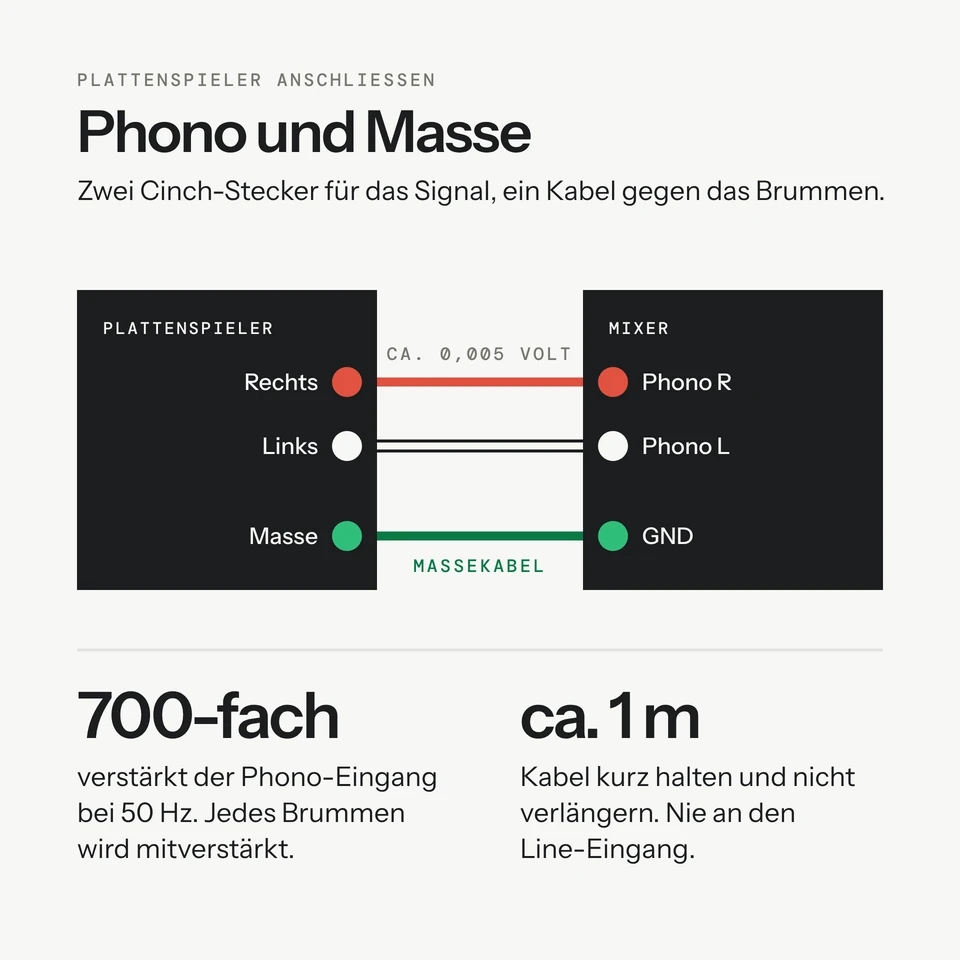
- Order: Switch off mixer and turntable. Plug the RCA cables into the phono input, red is right, white is left. Clamp the ground wire to the GND screw on the mixer. Power last.
- Selector switch: The mixer channel must be set to phono. On the line input a turntable sounds quiet and thin because gain and bass boost are missing. More on this in our guide DJ mixers compared.
- Models: On the SL-1210 MK7 RCA and ground cables are detachable and included. On the MK2, MK5 and M5G the cables are fixed.
Why the ground wire? Metal tonearm and housing shield the sensitive signal. This shielding only works when it is connected to the mixer's ground. Without that connection it picks up the 50 hertz field of the power lines instead of draining it. The phono input amplifies exactly this range the most, and it hums.
Why short cables? Cartridge, cable and input together form a resonant circuit. For the Concorde, Ortofon recommends a load capacitance of 200 to 600 picofarads, meaning cable and input together. An RCA cable adds roughly 100 picofarads per metre. With several metres of cable the treble changes and the weak signal picks up more interference. That is why the mixer stands right next to the turntables and phono cables are not extended.
- Keep sources of interference away: Power supplies, power cables and phones do not belong next to the cartridge and RCA cables.
08. Feedback: when the bass builds up
A low rumble that keeps growing with the volume is almost always feedback. The bass from the speakers makes floor, table and turntable vibrate. The stylus cannot tell whether the groove is moving or the whole record. It picks up the vibration, the phono input boosts it strongly, the speakers play it back and the loop closes.
Remedies, in the order of how much they help:
- Distance: Don't put turntables on the same stage or riser as the subwoofers, and not directly in front of them.
- Keep the bass off the stage: Directional arrangements such as cardioid make the bass behind the subwoofers much quieter. How that works is explained in our guide Setting up the subwoofer.
- Decoupling: A heavy board on soft feet or dampers such as the Luke ASB-1 acts like a shock absorber. Such a mass-spring system only stops passing vibrations above its own resonance. So the heavier and the softer the mounting, the lower the effect reaches.
- Monitor speakers: don't put them on the table the turntables are on.
- Cut the lows: Lower the channel's bass control slightly, or use a high-pass filter if the mixer has one.
- Cartridge: A cartridge with higher output such as the Concorde Club needs less gain and, according to Ortofon, is less prone to it.
09. Common problems and how to fix them
- The stylus skips: Remove dust from the stylus. Check the tracking force. Is the turntable level? Anti-skating at 0 when back-cueing. If the floor or stage wobbles, only decoupling helps. If it keeps skipping, the record is warped or the stylus is worn.
- It sounds distorted or sibilant: Stylus dirty or worn, tracking force too low, or the mixer channel is clipping. If the distortion only appears towards the end of the side, it is usually the stylus.
- One channel is missing: Usually the cartridge is not seated properly in the tonearm. Loosen the locking nut, insert the cartridge straight, tighten the nut. Then check the RCA plugs. To narrow it down, swap red and white: if the fault moves with them, it is before the mixer.
- It hums: Connect the ground wire and tighten the screw. Move power supplies and power cables away from the RCA cable. Don't extend phono cables.
- It rumbles and keeps getting louder: Feedback, see section 08.
- Quiet and thin: The turntable is plugged into the line input, or the selector switch is set wrong.
- Loud and distorted: A turntable with a built-in preamp is plugged into the phono input and amplified twice. This doesn't happen with the SL-1210, but it does with hi-fi models.
- Wrong speed: 33 or 45 rpm selected wrongly, or the pitch fader is not at 0. On the MK7 the reset button sets it back.
- Left and right swapped: Swap the RCA plugs at the mixer.
- The arm pulls outwards: Anti-skating too high or turntable not level.
10. Transport and quick check
Before every transport, lock the tonearm in its rest, fit the stylus guard and ideally remove the cartridge. Without a flight case, Technics also recommends removing the platter and counterweight.
The quick check before the first transition:
- Turntable is level and not next to the subwoofers.
- Cartridge is secure, stylus is clean.
- Arm balanced, tracking force as per manufacturer (Concorde: 3 or 4 g).
- Anti-skating to suit the use, arm parallel to the record.
- RCA to phono, ground wire to GND, selector switch on phono.
- With the system turned up and the record stopped, lower the stylus: if it stays quiet, everything is fine.
Rent turntables in Berlin →
Need turntables, mixer and sound system from one source? Write to us or call: 030 2000 5443.
Sources: Technics SL-1200/1210 MK7, specifications and operating instructions · Ortofon DJ FAQ · Ortofon FAQ · Ortofon Concorde MKII Club, data sheet · Stereophile: The skating force phenomenon · Wikipedia: RIAA equalization. Calculated values are rounded guide values.

Related Posts

Office Christmas party: the AV equipment you really need
Mic, music system, lights and power: the checklist for the Christmas party…

Power at events: mains connection, generator or battery?
How much power does your party need, when is a socket enough, and when…

Company party and Christmas party: technical checklist for organizers
Management speech, presentation, dinner and party: With this…