



A PA system consists of just a few parts: mixer, power amp (i.e. the amplifier), tops, subwoofers and cables. Whether it sounds clean and loud or hums, distorts and pops is almost always decided by the setup. Here is how to set up, connect and switch on a PA properly, step by step, and why it is done that way.
The examples refer to our Funktion One systems 03 to 07 with two tops, two subwoofers and a PL Audio power amp. The principle applies to every PA, from birthday parties to open airs. Which system suits your guest count is shown by the PA calculator in our guide Which music system for how many guests?

Tops on stands to the left and right of the DJ booth at VOLLKOMMEN Open Air
01. The signal path: what goes where
In a PA, music always flows in the same direction: from the player via the mixer to the power amp and from there to the speakers. At each stage, the strength of the signal changes. That is why the cables have different connectors, and why many things cannot be plugged in wrong at all.
Click on a device or a cable
Player
CDJs and laptops deliver line level, around 1 volt. A turntable delivers only a few millivolts, around 200 times less. It therefore needs the phono input on the mixer, which boosts the signal and corrects the sound.
Typical mistake: Turntable on the line input. Then it sounds very quiet and thin.
RCA cable
Unbalanced: one core plus shield. Interference from power cables ends up directly in the signal. So as short as possible, usually 1 to 2 metres.
Typical mistake: long RCA cables or cables running parallel to power lines. Result: hum and crackle.
Mixer
This is where the mixing happens and where the PA gets loud. The channels are set with gain so that the meter stays just below red at the loudest passages. The master passes the signal on to the power amp.
Typical mistake: Gain or master in the red. The music distorts and the power amp limits constantly.
XLR cable
Balanced: the signal runs twice, once with inverted polarity. Interference hits both cores equally and cancels out at the input. That is why even 20 or 50 metres work without hum.
Typical mistake: Booth output instead of master to the power amp. Then the booth knob controls the whole system.
Power amp with DSP
The power amp, i.e. the amplifier, turns around 1 volt into up to 60 volts and more. The built-in DSP splits bass and treble, aligns delays and protects the speakers with a limiter. Power comes via powerCON.
Typical mistake: Switching the power amp on first. When you switch on the mixer and players, there is then a loud pop.
Speakon cable
Carries the full speaker power. The plug is inserted and turned to the right until it clicks. That way it cannot come loose.
Typical mistake: Cables swapped between the top and bass outputs. The bass is missing, and the tops get deep bass they cannot handle.
Tops
Play everything from around 100 hertz: vocals, hi-hats, synths. They stand on stands or on the subwoofers, with the horns above head height so the treble reaches the back too.
Typical mistake: Horns at chest height. Too loud at the front, dull at the back.
Subwoofers
Play the bass up to around 100 hertz. Low tones spread out almost in all directions, so placement is decisive: placed together they add up, far apart they create holes in the bass.
Typical mistake: Subwoofers in different corners. More on this in our guide Setting up the subwoofer.
Bars on a logarithmic scale: each step is a multiple.
What you hear: very quiet, thin, hardly any bass.
Why: A turntable delivers only millivolts and a deliberately bent frequency response. Only the phono preamp raises the level and corrects the sound.
Fix: Set the mixer channel to phono and attach the ground wire to the ground screw.
What you hear: Hum, buzz, sometimes clicks when lights are switched.
Why: An unbalanced cable picks up interference over a long run, which gets amplified too.
Fix: Place the players right next to the mixer. Long runs only balanced with XLR.
What you hear: distorted, squashed, the kick drum sounds muddy.
Why: The signal is already clipping in the mixer. It doesn't get louder; the power amp just limits.
Fix: Turn the gain down until the meter stays just below red at the loudest passages.
What you hear: a hard pop when switching on the mixer or player.
Why: Devices emit a voltage spike when switched on, and the running power amp amplifies it.
Fix: Power amp on last and off first.
What you hear: hardly any bass, the tops sound dull and strained.
Why: The tops get the deep bass, the subwoofers only the mids. This can overload the tops.
Fix: Turn down immediately and re-plug: subwoofers to the bass output, tops to the top outputs.
What you hear: a steady low hum, even without music.
Why: If mixer and power amp are on different circuits, an equalising current flows through the cable shields. This is called a ground loop.
Fix: Mixer, players and power amp on one shared circuit or distribution board.
- Players and mixer: CDJs, laptops and mixing consoles work at line level. That is voltages of around 1 volt. A turntable delivers only a few thousandths of a volt and therefore needs its own phono input. More on this in our guide Setting up a turntable properly.
- Power amp (amplifier): Power amp, power amplifier and amp all mean the same device. In live sound it is usually called a power amp because it is the last stage before the speaker. It turns the line signal into the power that moves a speaker cone. For scale: for 1,000 watts to reach a 4 ohm speaker, it takes around 63 volts (power = voltage² ÷ resistance). So a speaker cable carries many times the voltage of a signal cable.
- DSP: The built-in processor splits the signal. The subwoofers get the bass up to around 100 hertz, the tops everything above. Add delay, EQ and a limiter that protects the speakers from overload. On our systems the matching preset is already loaded.
Active or passive? Active speakers have the power amp built in. They get power and an XLR signal, done. Passive speakers like our Funktion One systems need the external power amp with DSP. This is standard for large systems because power amp and speakers are precisely matched. More on this in our guide PA-Topteile.
02. Cables and connectors
Every connector has a job. Knowing them helps you find faults faster and avoid typical sources of interference such as long unbalanced cables or plugs that come loose under tension.
| Connector | What it carries | Typical use | Watch out for |
|---|---|---|---|
| XLR (3-pin) | Line or microphone signal, balanced | Mixer to power amp, microphone to mixer | low-noise even over many metres |
| Jack 6.3 mm | Line signal, balanced (3 contacts) or unbalanced (2) | Booth output, instruments | keep mono jack runs short |
| RCA | Line or phono signal, unbalanced | CDJ and turntable to mixer | as short as possible |
| Speakon (NL2, NL4) | Speaker power | Power amp to tops and subwoofers | insert and turn right until it clicks |
| powerCON | Mains power 230 V | Power to the power amp | lock it, plug in first, then switch on |
| Schuko, CEE | Mains power | Socket, distribution, three-phase power | don't overload circuits |
Why balanced? A balanced cable carries the signal twice, once normal and once with inverted polarity. Interference picked up along the way hits both cores equally. At the input, the inverted core is flipped back and both are added: the signal adds up, the interference cancels out. That is why XLR cables manage many metres without hum, and RCA cables don't.
Why short speaker cables? A speaker cable has a small resistance that grows with length. With 20 metres of 2.5 mm² cable it is around 0.3 ohms there and back. On a 4 ohm speaker that costs a good half decibel, with thin 1.5 mm² already around 1 dB (own calculation with copper). The power amp also controls the cone less well, and the bass gets softer. The rule: place the power amp close to the speakers and make the XLR cable from the mixer long instead.
Our systems 03 to 07 include: 2 XLR cables (5 m), 4 Speakon cables (2 × 5 m, 2 × 10 m) and a powerCON cable. Longer cables are available as Speakon cable in our rental shop.
03. Setup step by step
The video shows the setup of our systems 03 to 07 in one minute. The steps are explained in detail below.
- Make a plan: Where is the DJ booth, where do the guests dance, where is power? Escape routes and doors stay clear. The system plays to the dance floor, not to walls, windows or neighbours.
- Set up the subwoofers: Both subwoofers side by side in the middle, ideally in front of or next to the DJ booth. Placed together they work like one large source, and there are no spots where the bass cancels out. Subwoofers on the outside with the tops on top also works, but is less even. Why is explained in our guide Setting up the subwoofer.
- Set up the stands: Fold the legs out fully, on firm, level ground. Put the top on and crank it up so the horns are above head height, about 2 metres. The load capacity is on the stand; an F101 weighs 10 kilograms. Outdoors, sandbags go on the stand legs.
- Aim the tops: Both the same distance from the centre, both aimed at the dance floor and at the same angle. How far apart and how much to angle them in is explained in our guide PA-Topteile.
- Place the power amp: close to the subwoofers, with free ventilation slots front and back. Not in direct sun and not under blankets or bags.
- Connect the speakers: Insert the Speakon plug and turn it to the right until it clicks. On our systems 03 to 07, both subwoofers go to the “BASS parallel” output: first into subwoofer 1, from there with the second cable on to subwoofer 2. The tops go to the two upper outputs. The red connector stays free.
- Connect the signal: Master output of the mixer via XLR into inputs A and B of the power amp, left and right. Use the booth output for a monitor at the DJ booth, never the master twice.
- Connect the power: Everything is switched off. First plug in mixer and players, then the powerCON cable into the power amp. Route and secure cables neatly (section 06).
- Switch on and soundcheck: in the right order (section 04) and start at a low level (section 05).

Top on a stand at 72 HOURS May Day Open Air: horns above head height
04. Switching on and off: the order
Many devices emit a short voltage spike when switched on and off. If the power amp is on at that moment, it amplifies it, and a hard pop comes out of the speakers. That is kind neither to the audience nor to the tweeters. So there is a simple rule: the power amp goes on last and off first.
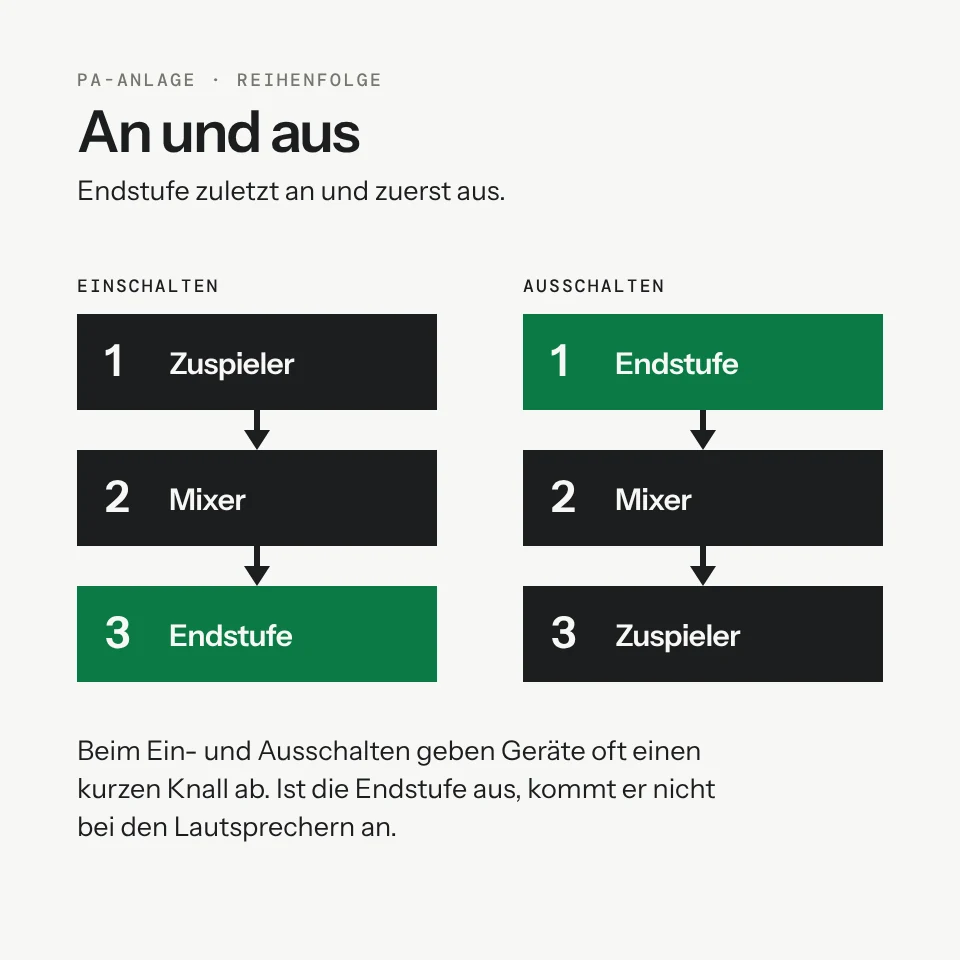
- Switching on: first the players (CDJs, laptop), then the mixer, the power amp at the very end. The master on the mixer is at zero.
- Switching off: Master on the mixer down, power amp off, wait a few seconds, then mixer and players.
- Re-plugging: Anyone re-plugging a cable on the mixer or power amp during the evening switches the power amp off first, or at least pulls the master all the way down.
05. Setting levels correctly
A PA gets loud at the mixer, not at the power amp. The power amp works with the preset that matches the speakers. At the mixer it is about giving each stage exactly enough signal so that it does not clip. Experts call this gain staging.
- Gain per channel: Play a track and set the gain knob so that the channel meter sits around 0 dB in loud passages. Red means clipping.
- Master: Turn it up slowly until it is loud enough on the dance floor. The master meter shouldn't sit in the red constantly either.
- Limiter: If the limiter light on the power amp is on constantly, the system is at its limit. It won't get louder, only more squashed. Only a bigger system brings more volume.
What decibels mean: Doubling the amplifier power brings only 3 dB more. We only perceive around 10 dB more as twice as loud, which is about ten times the power. That is why it is so tempting to keep turning up the master, and why a system that is too small distorts so quickly.
Why the height of the speakers matters: Outdoors, every doubling of distance makes it around 6 dB quieter. Someone standing 2 metres from the speaker gets around 18 dB more than someone at 16 metres. If the speakers are too low, it is too loud at the front and too quiet at the back. If they are above the heads, the distance to all guests is more similar and the level is spread more evenly. Indoors the reverberation helps a little; the principle stays the same.
Try it out: drag the person further away and see how quickly the level drops.
How loud is it where?
Level at this spot96dB above the guide value for audiences
Conversation85 dB
Hearing protection for staff99 dB
Guide value DIN 15905-5120 dB
Pain threshold
Calculated outdoors using the inverse square law: around 6 dB less per doubling of distance. Two speakers add about 3 dB. Indoors the level drops more slowly because walls reflect the sound. The DIN guide value of 99 dB(A) applies as an average over 30 minutes at the loudest audience position.
Protect your ears: For events with an audience, the DIN 15905-5 standard specifies an average level of at most 99 dB(A) over 30 minutes. For open airs in Berlin there are also rules to protect neighbours. More on this in our guide Open air in Berlin.
06. Power and cable routes
A Schuko socket is usually fused at 16 amps. At 230 volts that is around 3,700 watts per circuit in theory. But often several sockets share the same circuit, and a fridge or coffee machine is running too. So plan with headroom and keep lighting, fog and catering off the system's circuit.
| Setup | Guests | Power consumption | Power |
|---|---|---|---|
| Funktion One PA System 03 | about 100 | approx. 1.5 kW | one Schuko socket |
| Funktion One PA system 11 | about 200 | ca. 3,5 kW | dedicated circuit or CEE |
Values from our product pages. More guide values in our guide Power at events.
- Unroll cable reels fully: When coiled, a cable cannot dissipate heat and gets hot. The permitted load when coiled is printed on the reel and is much lower.
- One circuit for the sound: If mixer, laptop and power amp are on different circuits, it can hum (section 07).
- Secure cables: Where guests walk, cables belong under cable ramps or taped to the floor with gaffer tape. Don't run cables across doors and escape routes.
- Outdoors: Don't leave connections in puddles, and protect the power amp and mixer from rain.

From above: DJ booth, subwoofers and tops at VOLLKOMMEN Open Air on the Spree
07. Common problems and how to fix them
- No sound: Follow the signal path. Does the mixer show levels? Is the XLR cable in the master output and not in the booth? Is the power amp on and not muted? Are the Speakon plugs locked?
- Only bass or only treble: A speaker cable is in the wrong output of the power amp. Subwoofers go to the bass output, tops to the top outputs.
- One side is missing: Swap the left and right cables. If the fault moves with them, it is in the cable or before it; otherwise it is the speaker or the power amp channel.
- It hums: Usually a ground loop. Connect all audio devices to the same circuit and the same power strip. A laptop on its power supply is a common cause; try running it on battery. Keep unbalanced cables short. If that doesn't help, a DI box with ground lift separates the ground. If only the turntable hums, the ground wire is missing.
- It distorts: Channel or master meter on the mixer in the red. Turn the gain down. If the power amp's limiter is lit constantly, the system is too small for the volume.
- Microphone squeals: Feedback. Tops stand in front of the microphone, never behind it. Don't point the microphone towards the speakers and don't set the microphone gain higher than necessary.
- Pop when switching on or off: The power amp was on. Follow the order from section 04.
- Thin bass in some spots: The subwoofers are far apart and cancel each other out. Placing them together helps.
- Fuse trips: The circuit is overloaded. Spread devices across several circuits, especially fog machines and heaters.
08. Teardown and quick check
Teardown runs in reverse: master down, power amp off, then mixer and players, only then the cables. Unlock Speakon plugs before pulling them. Coil cables without kinks and don't wrap them around your elbow, or the cores will twist. Lift the tops off the stands before retracting the stands, and do it in pairs.
The quick check before the first track:
- Subwoofers together in the middle, tops symmetrical, horns above head height.
- Stands fully unfolded and secured, outdoors with sandbags.
- Speakon locked: subwoofers to bass, tops to top.
- XLR from the master output into inputs A and B.
- All audio devices on one circuit, cable reels unrolled, cables secured.
- Switched on in the order players, mixer, power amp.
- Gain set so that the meters aren't in the red.
09. Set it up yourself or have it set up?
You can collect and set up systems 03 to 07 with F101 or F1201 and F118 yourself. They fit in an estate car; to carry the 50 kilogram subwoofers you should be two people. From the systems with F218 subwoofers (93 kg each) we recommend delivery and setup by us. With Resolution 2, BR221 and EVO 7T, setup and tuning are always included. Which system suits how many guests is covered in our guide Funktion One: models at a glance.
Would you rather have the system delivered and set up? Write to us or call: 030 2000 5443.
Sources: ProSoundWeb: Proper PA Power Sequencing · QSC: Balanced Cables · Saxon State Office for Environment: hearing damage from music (DIN 15905-5) · Manufacturer specifications Funktion One and PL Audio · Akari product pages. Calculated values are rounded guide values.

Related Posts
Setting up a turntable properly: tonearm, stylus, tracking force and grounding
Balance the tonearm, set tracking force and anti-skating, connect…


Office Christmas party: the AV equipment you really need
Mic, music system, lights and power: the checklist for the Christmas party…
Power at events: mains connection, generator or battery?
How much power does your party need, when is a socket enough, and when…